SharkTTY Desk runs on your Mac so the SharkTTY app on your iPhone or iPad can see every display at once and control any screen by touch — from anywhere, with no port forwarding and end-to-end encryption. Add a virtual display, unlock the lock screen remotely, and more.
Version 0.8.0 · macOS 14+ (Apple Silicon) · Signed & notarized by Apple · What's new →
Needs SharkTTY 1.6 or later on your iPhone or iPad. Still on an older app? Download Desk 0.5.0 →
Install once on the Mac. Pair it with SharkTTY on your iOS device and your Mac appears in the app's Remote Desktop list.
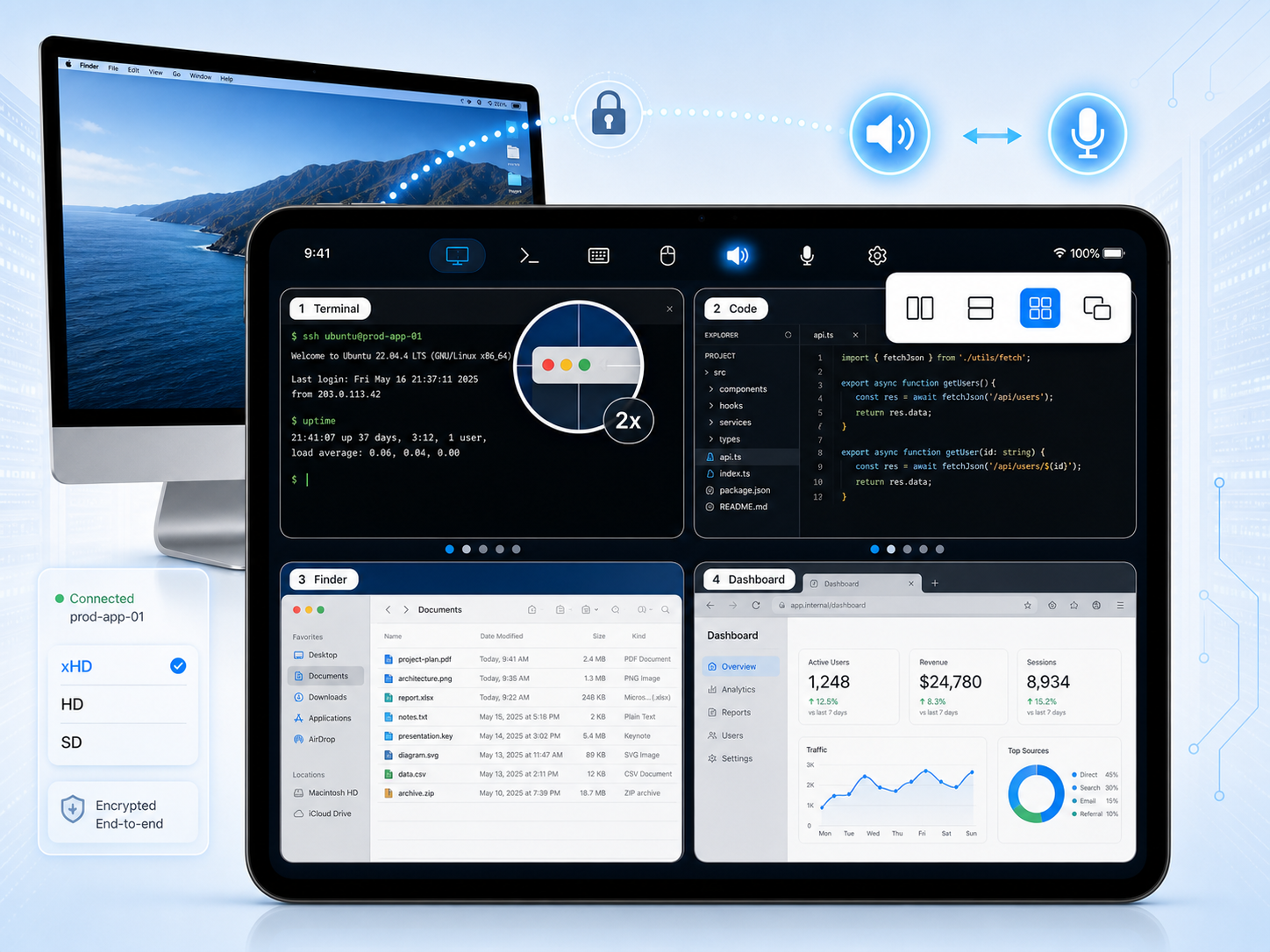
Two, three, or more monitors? Arrange them side by side, stacked, in a quad grid, or picture-in-picture — in whatever order you like — then tap any screen to take control of it. Each display streams on demand, so a full multi-monitor Mac fits in your hands.
Keyboard, mouse, trackpad gestures, and a virtual pointer — two-finger tap to right-click. Type on a floating on-screen keyboard you can move, resize and dim, with full symbols, ⌘⌥⌃ modifiers and F-keys, or switch to the system keyboard. Send macOS shortcuts — ⌘C/⌘V, Force Quit, Spotlight, Mission Control, window tiling — and sync the clipboard both ways.
Hardware-accelerated H.264 from ScreenCaptureKit, with client-driven resolution from an xHD native-pixel tier down to a smooth low-bandwidth mode that downgrades automatically when the network dips — plus a native-resolution magnifier for pixel-precise work.
Spin up an extra, headless screen sized to your iPad — perfect for a Mac mini with no monitor, or a second workspace you carry with you.
Wake a sleeping Mac over the network, keep it awake while you're connected, and — optionally — view the login window and type your password to unlock it remotely after a reboot.
Hear the Mac's system audio on your device, and use your iPhone or iPad as the Mac's microphone for calls, recordings, and dictation. Needs SharkTTY 1.7+.
End-to-end encrypted sessions; a relay only ever forwards ciphertext. Screen Recording and Accessibility are granted by you, on the Mac. Lives quietly in the menu bar — no Dock clutter.
Both your Mac and your device dial out, so there's never a port to open or a VPN to set up.
On the same network the agent and viewer connect directly over QUIC for the lowest latency, with each display streaming on demand.
Across networks, sessions route through a managed relay — or a WebSocket-over-443 fallback for locked-down Wi-Fi. Every session is end-to-end encrypted; the relay only ever forwards ciphertext.
On your local network, several iPhones and iPads can view and control the same Mac at once. Approve each viewer before it gets in, and kick anyone off with a tap.
Prefer not to route through our servers? Run the open-source desk-relay on any public box with no SharkTTY account. Both ends dial out to it; it pairs them by room and forwards their encrypted streams. Point SharkTTY Desk at its address and scan the relay link from any network.
Standalone relay runs QUIC on --bind and a WebSocket-over-443 fallback on --wss-bind; link creation is protected by your own shared secret.
$ desk-relay \ --bind 0.0.0.0:4443 \ --wss-bind 0.0.0.0:8080 \ --public-url https://relay.example.com \ --shared-secret '<random-long-secret>'
From download to a live remote desktop in a couple of minutes.
Open the DMG and drag SharkTTY Desk into your Applications folder, then launch it. It lives in the menu bar.
Allow Screen Recording and Accessibility when prompted (System Settings → Privacy & Security) so it can capture the screen and inject input.
Sign in to the same account, scan the pairing QR, or open a share link — this Mac shows up under Remote Desktop in SharkTTY on your iPhone or iPad.
Need the iOS app first? Get SharkTTY for iPhone & iPad — it's a free download on the App Store.
Check your SharkTTY app version first
SharkTTY Desk 0.8.0 requires SharkTTY 1.6 or later on your iPhone or iPad. If your app is older than 1.6, update it on the App Store — or, if you can't update yet, download SharkTTY Desk 0.5.0 instead, which works with pre-1.6 apps.
Everything you need to know about controlling your Mac from an iPhone or iPad.
Yes. Install SharkTTY Desk on your Mac and the free SharkTTY app on your iPhone or iPad, and you can see and control your Mac's full desktop — keyboard, mouse, and trackpad included.
Both. SharkTTY connects peer-to-peer for the lowest latency and falls back to an end-to-end encrypted relay when a direct path isn't available — so you can reach your Mac from anywhere with no port forwarding or VPN to set up.
Yes. If your Mac has multiple displays, SharkTTY can show them all at once on your iPhone or iPad — side by side, stacked, in a quad grid, or picture-in-picture, in whatever order you like — and you tap any screen to take control of it. You can also focus a single display for a larger view.
Yes — on your local network, several devices can view and control the same Mac at once. The Mac can require approving each new viewer, and can kick any viewer off at any time.
Yes. The relay is open source, so you can run the standalone desk-relay on your own public host with no SharkTTY account — QUIC plus a WebSocket-over-443 fallback, with link creation protected by your own shared secret. Point SharkTTY Desk at it and you're the only party that ever touches the traffic.
Yes (beta). SharkTTY Desk can create an extra, headless virtual display sized to your iPad — handy for a Mac mini with no monitor, or a second portable workspace.
Yes. SharkTTY Desk for Mac is a free download, and the SharkTTY app for iPhone and iPad is free on the App Store.
Every session is end-to-end encrypted. When a relay is used it only ever forwards ciphertext, and Screen Recording and Accessibility permissions are granted by you, locally on the Mac.
A Mac on macOS 14 Sonoma or later with Apple Silicon (M1 or newer), plus SharkTTY on an iPhone or iPad to connect from. The app is signed with a Developer ID and notarized by Apple, so it opens cleanly.
SharkTTY Desk 0.8.0 requires SharkTTY 1.6 or later on your iPhone or iPad. If your app is older than 1.6, update it from the App Store. If you can't update yet, download the earlier SharkTTY Desk 0.5.0 build, which is compatible with pre-1.6 apps.
Optionally, yes. SharkTTY Desk can show the macOS login window so you can type your password and unlock an unattended Mac remotely.