Easy Eyes provides structured two-minute breaks for screen-fatigued eyes. This guide covers all eleven guided practices, smart reminder scheduling, habit tracking, and spatial exercise on Apple platforms.
Available soon on iPhone, iPad, Apple TV, and Apple Vision Pro.
Getting Started
Modern work demands hours of sustained near-focus staring at illuminated screens. Staring at close displays reduces natural blinking by more than half, holds the focusing ciliary muscles in continuous contraction, and locks the eyes in static gaze angles. Easy Eyes offers a quiet antidote: quick, evidence-grounded sessions designed to fit naturally into a working day.
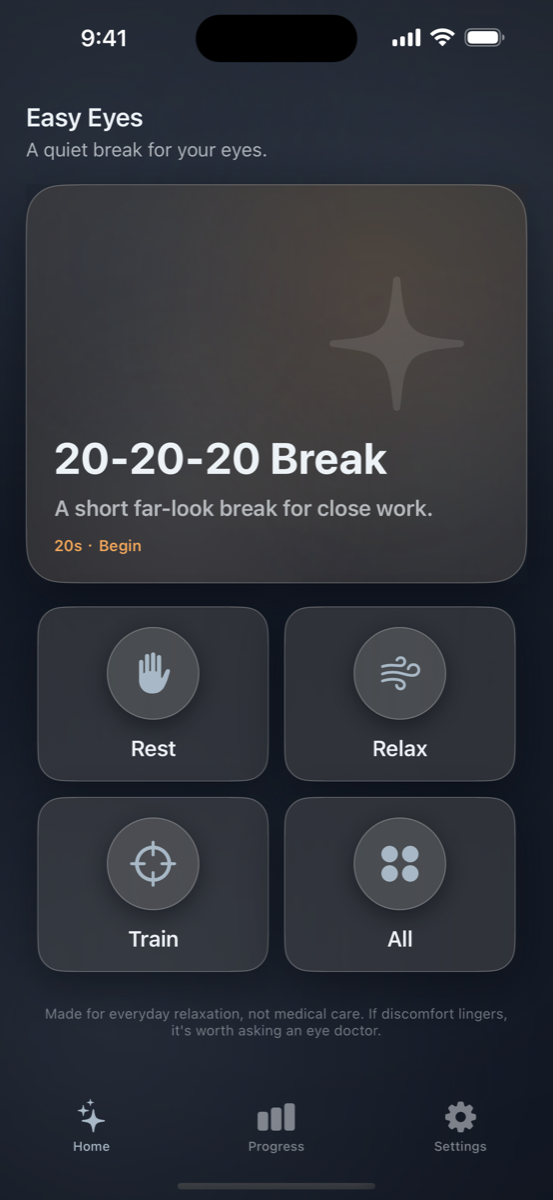
When you open Easy Eyes, the home screen immediately suggests the most appropriate exercise for your time of day. In the morning, it offers a gentle tracking exercise to awaken your ocular muscles; during peak work hours, it prompts a 20-20-20 distance reset; in the evening, it defaults to calming breathwork.
If you want a specific practice, choose between Rest (far looks and warm palming), Relax (paced breathing and eyes-closed audio), or Train (smooth pursuit tracking, gaze stretches, and full blinks). Each category is accessible with one tap.
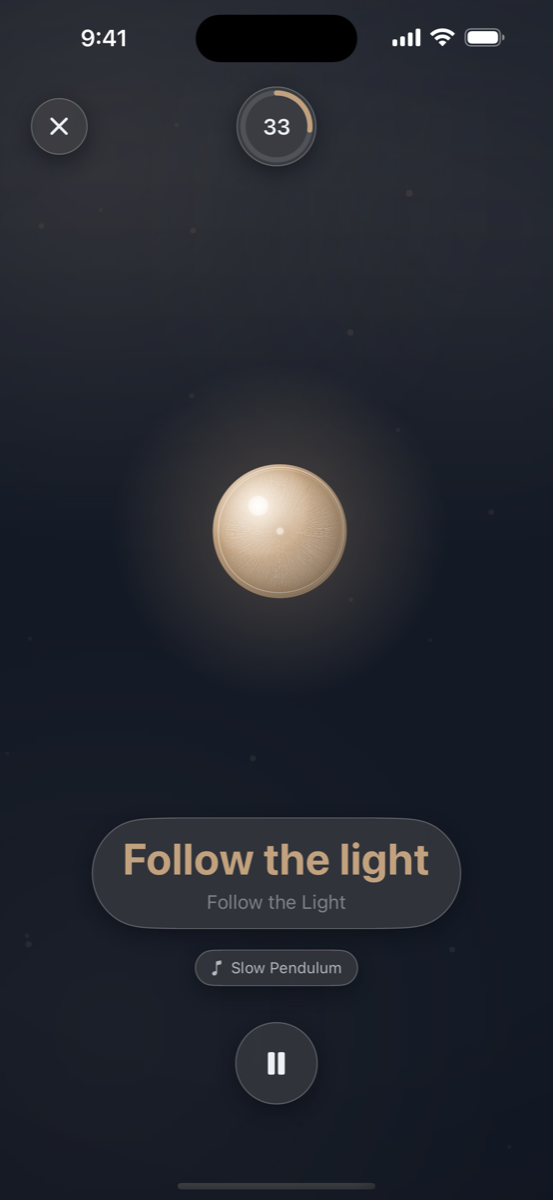
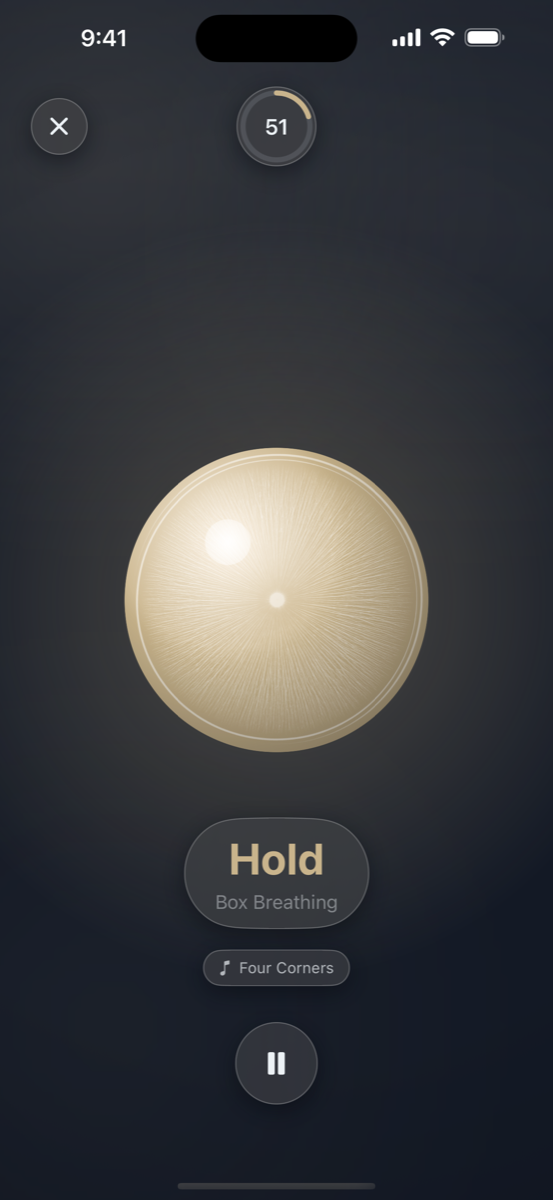
During a session, you do not need to read small text. A warm glowing orb guides your gaze, full-eyelid animations prompt thorough blinks, and spoken voice guidance tells you when to inhale, exhale, hold, or shift focus.
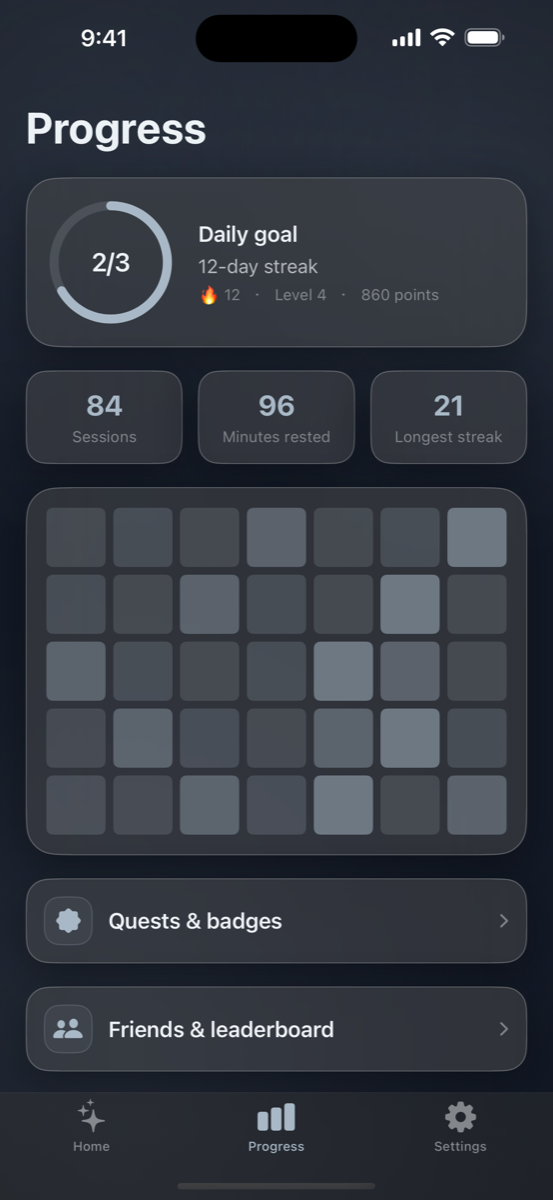
Every completed session logs an automatic check-in. Earn tiered badges, maintain daily streaks, complete daily and weekly quests, and optionally connect with friends to rest together.
Practice Catalog
Each mode is built on established ophthalmological and ergonomic parameters from the AAO, NEI, and peer-reviewed clinical studies. All sessions run under two minutes.
Designed specifically for pauses during computer work, reading, and mobile screen use.
Purpose: Relaxes the ciliary muscles responsible for near-point accommodation and prompts natural tear film replenishment.
How to do it: Look away from your screen at a physical object at least 20 feet (6 meters) away—out a window or down a long hallway. Soften your gaze and blink slowly until the completion chime sounds.
Purpose: Provides absolute darkness and gentle thermal warmth to soothe fatigued periocular muscles and reduce sensory stimulation.
How to do it: Rub your palms together until warm, gently cup them over your closed eyes without pressing on your eyeballs, and rest your elbows on a desk. Breathe slowly with the soft audio cues.
Combines autonomic nervous system regulation with eye rest to lower tension.
Purpose: Equal 4-4-4-4 second breath pacing stimulates the vagus nerve and stabilizes heart rate variability during stressful work periods.
How to do it: Follow the glowing orb along the four sides of a square: inhale for 4 seconds, hold full for 4 seconds, exhale for 4 seconds, and hold empty for 4 seconds over four complete cycles.
Purpose: Paces respiration at approximately 5.5 breaths per minute, the resonant frequency that optimizes autonomic balance and circulation.
How to do it: Close your eyes and breathe smoothly: a gentle 5.5-second inhalation followed immediately by a 5.5-second exhalation with no holds.
Purpose: A classic calming breath technique pioneered by Dr. Andrew Weil that promotes sleep onset and deep evening relaxation.
How to do it: Inhale quietly through your nose for 4 seconds, hold your breath gently for 7 seconds, and exhale completely through your mouth for 8 seconds across four cycles.
Purpose: A complete sensory rest break combining progressive relaxation voice prompts with soothing soundscapes.
How to do it: Close your eyes, turn your device face down or set it aside, and listen to the voice guidance guiding you to release tension from your forehead, temples, and neck.
Subtle extraocular movement routines and blink training for dry, static eyes.
Purpose: Engages smooth pursuit eye movements across a 15-degree horizontal arc, exercising the lateral and medial rectus muscles without head movement.
How to do it: Keep your head still and follow the softly glowing light as it glides smoothly from left to right and back across the display.
Purpose: Smooth lemniscate figure-8 movement coordinating horizontal, vertical, and oblique extraocular muscle pairs in a fluid trajectory.
How to do it: Track the orb as it draws a slow horizontal figure-8 pattern, reversing direction midway through the session.
Purpose: Relieves the stiffness caused by prolonged straight-ahead staring by moving gaze to eight distinct radial directions.
How to do it: Look toward each target position (up, down, left, right, and four diagonal corners) for 3 seconds, returning to center for 1 second between stretches.
Purpose: Directly targets dry eye discomfort by training full upper-to-lower eyelid contact to express the meibomian lipid layer across the cornea.
How to do it: Follow the animated eyelid guide: close both eyes fully for 1 second, hold closed softly for 2 seconds without squeezing, and open for 1 second across seven cycles.
Purpose: Promotes comfortable vergence and depth awareness by transitioning between near and far visual targets.
How to do it: Observe the glowing orb as it smoothly travels between perceived foreground and background positions, holding focus at each depth.
Reminders & Timing
The greatest challenge in eye care is remembering to pause before discomfort begins. Easy Eyes provides two reminder strategies built into iOS notifications.
Set specific daily reminder alerts. We recommend choosing times that fall 10 to 15 minutes off the hour (such as 10:15 AM or 2:45 PM) so notifications do not collide with scheduled calendar meetings.
Enable automatic recurring prompts every two hours from Monday through Friday during standard working hours. This provides reliable pacing throughout long desk days without requiring manual alarms.
All local notifications mirror seamlessly to your Apple Watch, giving you a subtle wrist tap to lift your eyes from the screen even when your phone is in your pocket.
Endorsed by the American Academy of Ophthalmology (AAO) and the American Optometric Association (AOA), the 20-20-20 guideline suggests that every 20 minutes of screen time, you should look at a real object 20 feet away for at least 20 seconds. This brief pause releases continuous accommodative muscle tension and triggers reflexive blinking.
Progress & Streaks
Easy Eyes encourages consistency with calm, non-coercive habit mechanics. There are no punishing penalties for taking a weekend off.
Every practice session you finish records a completed check-in. Your progress updates immediately, tallying total minutes, completed sessions, and active streaks.
The Progress screen displays your current streak alongside a calendar heatmap showing your historical consistency across weeks and months.
Unlock bronze, silver, and gold medals as you build your practice. Milestones include First Rest, 3-Day / 7-Day / 30-Day Streaks, One Hour Rested, Explorer (trying 5 distinct modes), and Breath Master.
Optional quests provide gentle inspiration: Daily Check-in, Refresh Your Eyes (complete a blink or palming session), Take a Breath, and weekly milestones like Steady Week (15 sessions) or Half Hour of Calm.
Multiplatform Support
Native SwiftUI architecture tailored to each device form factor.
Portable, tactile sessions with haptic feedback, split-screen iPad multitasking support, and fluid portrait/landscape transitions. Ideal for quick desk pauses and commute wind-downs.
Experience large-scale eye stretches and ambient music across the room. The wider physical display angle makes smooth pursuit and gaze compass exercises particularly expansive.
A dedicated spatial edition running in mixed passthrough. Practice controls float on a translucent glass panel beneath your gaze while a 3D RealityKit orb moves through comfortable room depth.
Virtual objects inside a VR/AR headset move in stereoscopic 3D space, which provides binocular vergence and motion parallax cues. However, headset displays have a fixed optical focal distance. Virtual near-far exercises do not alter lens accommodation. For a genuine 20-20-20 distance break, remove the headset and look at a real physical object 6 meters away.
Health & Safety
Easy Eyes is created to support everyday visual comfort, promote healthy blinking habits, and offer relaxing screen pauses. We believe in complete transparency about what eye exercises can and cannot do.
Frequently Asked Questions
Easy Eyes configures its audio session to gently lower ('duck') background audio during spoken cues and restore volume immediately afterward. In Settings, you can also toggle voice guidance off or choose your preferred practice music bed.
Yes. All 11 exercise animations, timer engines, and audio guidance files are stored directly on your device. Completed check-ins are saved to a local queue and automatically synchronize with your account when your network reconnects.
When you first launch the app, you start immediately as a guest with full functionality. In Settings, you can upgrade to an email or Sign in with Apple account at any time. All of your historical check-ins, streaks, and badges are preserved during the upgrade.
Easy Eyes includes four crystal themes: Dusk (cool slate-blue), Ember (muted copper-graphite), Warm (pale gold neutral), and Paper (light mode). All themes use low-saturation tones designed to minimize light glare and avoid fatiguing your eyes.
We recommend doing a 20-second 20-20-20 break or 30-second Complete Blink every 20 to 30 minutes during intensive computer work, paired with one longer 2-minute breathing session in the middle of the day and one calming session in the evening.
Easy Eyes is coming soon to the App Store for iPhone, iPad, Apple TV, and Apple Vision Pro.
One-time purchase · $0.99 at launch · No subscriptions
Social Accountability
Rest together with friends
Eye health is easier when practiced with colleagues and friends. Easy Eyes includes a lightweight social graph designed for gentle mutual encouragement.
Friend Codes
Each user receives a unique six-character friend code. Share your code via Messages, AirDrop, or email to connect without sharing personal contact information.
Four Leaderboard Views
Compare activity across four friendly metrics: Total Points, Active Streak, Weekly Rest Minutes, and Weekly Completed Sessions.
Privacy First
Friends see only your chosen display name, avatar color, and eye-rest statistics. No location, private habits, or device details are ever shared.